You may also like:
- The 7 Essential Components Every Prompt Needs
- Long-Form Content Strategy (Prompting AI for 3000+ Word Articles)
- Advanced Prompt Techniques (Constraints, Personas, and Output Control)
You need a video script.
You ask AI: “Write a YouTube script about [topic].”
AI gives you something that looks like a script.
But when you try to record it, the problems appear.
It’s too stiff. Too written. Impossible to speak naturally.
Or it’s too casual. Rambling. No structure.
Here’s the issue: video scripts aren’t blog posts read aloud.
They’re a completely different format with different rules.
AI can write excellent video scripts.
But you need to guide it through the specific requirements of spoken content designed for visual media.
Today, you’ll learn the exact step-by-step process for taking a video idea and turning it into a production-ready script.
Not a written essay. A speakable, filmable, engaging video script.
Let’s build it.
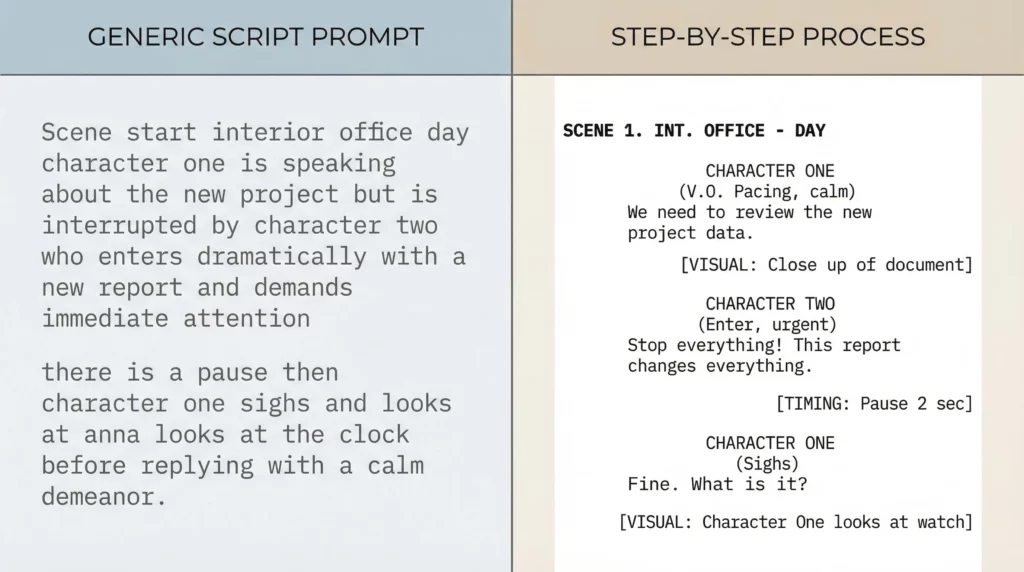
Why Generic “Write a Script” Prompts Fail
Most video scripts AI produces have the same problems:
Problem 1: Written language, not spoken language “One must consider the implications…” Nobody talks like that on camera.
Problem 2: No pacing or timing Paragraphs with no breaks. No indication of where to pause, emphasize, or speed up.
Problem 3: No visual cues Just walls of text. No notes about what should be on screen while you’re talking.
Problem 4: Wrong energy The tone is either too formal (lecture) or too enthusiastic (infomercial). Never just right.
Problem 5: No hook structure Scripts that build slowly. By the time they get interesting, viewers already left.
Video scripts require a systematic approach that addresses all five issues.
That’s what this process does.
The 7-Step Script Writing Process
Here’s the complete system, from idea to final draft.
Step 1: Idea Clarification & Structure Design (5 minutes)
Before writing anything, get crystal clear on what this video is.
The Idea Clarification Prompt:
I want to create a video about [TOPIC].

Help me clarify and structure this idea:

VIDEO BASICS:
1. Target length: [5 min, 10 min, 15 min, 30 seconds, etc.]
2. Platform: [YouTube, TikTok, Instagram Reels, etc.]
3. Target audience: [who they are, what they know already]
4. Primary goal: [educate, entertain, persuade, inspire]

STRUCTURE QUESTIONS:
1. What's the single most important point this video must communicate?
2. What's the best structure for this content?
   - Tutorial (step-by-step)
   - Story (narrative arc)
   - Listicle (numbered points)
   - Problem-solution
   - Comparison
3. What's the hook? (Why should someone keep watching past 10 seconds?)
4. What's the payoff? (What do they gain by watching to the end?)

Based on this, recommend:
- Ideal video length
- Best structure type
- Key sections/beats
- Approximate time per section
This gives you a strategic blueprint before you write a single word.
Example output: “5-minute YouTube tutorial. Hook: Show the end result first. Structure: Problem (30 sec) → Solution overview (45 sec) → 3 steps (3 min) → Common mistakes (45 sec) → Call-to-action (30 sec).”
That’s your roadmap.
Step 2: Hook Writing (10 minutes)
The first 10 seconds determine everything.
Write the hook separately, with full focus.
The Hook Writing Prompt:
Write 3 different hook options for this video:

VIDEO TOPIC: [Your topic]
TARGET AUDIENCE: [Your audience]
VIDEO STRUCTURE: [From Step 1]

HOOK REQUIREMENTS:
- First 5 seconds: Grab attention (bold statement, question, or unexpected visual)
- Next 5 seconds: Promise what they'll get by watching
- Total length: 10-15 seconds when spoken
- Write in spoken language (short sentences, conversational)
- Include [VISUAL CUE] notes for what's on screen

For each hook option, explain what pattern it uses:
- Pattern 1: Result-first (show the payoff immediately)
- Pattern 2: Problem-agitate (make them feel the pain)
- Pattern 3: Curiosity gap (tease something unexpected)

Format each hook as speakable script with timing.
Example output:
Hook Option 1 (Result-First): [VISUAL: Show the finished product/result] “This took me 20 minutes to make. [pause] And it got 47,000 views in 3 days. [pause] I’m going to show you exactly how I did it.” (12 seconds spoken)
Hook Option 2 (Problem-Agitate): [VISUAL: Frustrated person at computer] “Your videos are getting 200 views and you have no idea why. [pause] I had the same problem. [pause] Until I learned this one thing that changed everything.” (11 seconds spoken)
Pick the strongest. That’s your opening.
Step 3: Full Script Outline (10 minutes)
Now outline the complete script with timing.
The Script Outline Prompt:
Create a detailed script outline for this video:

BASICS:
Topic: [Your topic]
Length: [Target length]
Hook: [Paste your chosen hook]
Structure: [From Step 1]

OUTLINE REQUIREMENTS:

For each section, provide:
1. Section name and purpose
2. Target length (seconds/minutes)
3. Key points to cover (bullet points)
4. Transition to next section
5. Visual notes (what's on screen)

Example format:

SECTION 1: PROBLEM (30 seconds)
Purpose: Make them feel the pain point
Key points:
- Point 1
- Point 2
Transition: "But here's the thing nobody tells you..."
Visuals: [screen recording of problem, frustrated reactions]

Create the complete outline with timing that adds up to [target length].
Include: Opening hook, main content sections, closing/CTA.
This gives you the skeleton with strategic timing built in.
You know exactly how long each section should run.
Step 4: Section-by-Section Script Writing (30 minutes)
Write each section individually as spoken content.
The Section Writing Prompt:
Write the script for: SECTION [NUMBER] - [SECTION NAME]

CONTEXT:
- What came before: [Previous section summary]
- This section's purpose: [From outline]
- Target length: [Seconds from outline]
- Key points to cover: [From outline]

SPOKEN LANGUAGE REQUIREMENTS:
- Write how people actually talk (contractions, short sentences)
- Vary sentence length for natural rhythm
- Use [pause] markers where speaker should pause
- Use [emphasis] markers for words to stress
- No complex sentences (if it's hard to say, rewrite it)
- Include natural verbal connectors ("So...", "Here's the thing...", "Now...")

VISUAL CUES:
- Add [VISUAL: description] for what's on screen
- Add [B-ROLL: description] for supporting footage
- Add [GRAPHIC: description] for text/graphics to show

PACING INDICATORS:
- Mark sections to deliver faster [FAST]
- Mark sections to slow down for emphasis [SLOW]
- Include [beat] for longer pauses

Format as speakable script with timing check.
Example output:
SECTION 2: SOLUTION OVERVIEW (45 seconds)

[VISUAL: Simple graphic showing the 3-step process]

"So here's what actually works. [pause]

Three steps. [pause] That's it.

[SLOW] You don't need expensive equipment. You don't need years of experience. You just need to follow this specific process.

[FAST] Step one: [emphasis] capture attention in five seconds.
Step two: deliver value in three minutes.
Step three: end with a clear action.

[VISUAL: Zoom in on each step as mentioned]

That's the framework. Now let me break down exactly how each step works..."

[TRANSITION NOTE: Natural flow into detailed steps]

(Estimated: 44 seconds spoken at natural pace)
Repeat for each section.
Step 5: Conversational Polish (15 minutes)
AI writes spoken language better than most, but it’s not perfect.
Polish each section for speakability.
The Conversational Polish Prompt:
Review this script section and make it more conversational:

[PASTE SECTION]

POLISH FOR:
1. Remove any phrases that sound "written" not "spoken"
   - Before: "It is important to consider..."
   - After: "Here's what matters..."

2. Add natural verbal fillers where appropriate (but not too many)
   - "So...", "Now...", "Look...", "Here's the thing..."

3. Check if sentences are speakable
   - Read it aloud
   - If you stumble, it needs rewriting

4. Add personality
   - Where can humor fit naturally?
   - Where should enthusiasm show?
   - Where does serious/matter-of-fact work better?

5. Strengthen transitions between thoughts
   - Make sure ideas flow naturally
   - Add connective tissue where jumps feel abrupt

Rewrite any awkward sections. Keep all visual cues and pacing markers.
This takes the script from “AI-generated” to “sounds like you.”
Step 6: Timing Verification (10 minutes)
Scripts always run longer than you think.
Verify timing before you film.
The Timing Check Process:
- Read the entire script aloud at natural speaking pace
- Time each section
- Compare to your target timing from outline
The Timing Adjustment Prompt:
This section is running too long/short:

[PASTE SECTION]

Target time: [X seconds]
Current time: [Y seconds]
Difference: [over/under by Z seconds]

ADJUSTMENT NEEDED:
If too long: Cut lowest-value content, tighten language, remove redundancy
If too short: Add another example, expand explanation, add transition content

Rewrite this section to hit the target timing while maintaining:
- All key points
- Conversational flow
- Visual cues
- Pacing variety

Don't sacrifice quality to hit timing. If content needs the time, suggest adjusting overall video length instead.
Sometimes you’ll discover you need a 7-minute video, not 5 minutes.
That’s fine. Better to know before filming.
Step 7: Production Notes & Final Format (10 minutes)
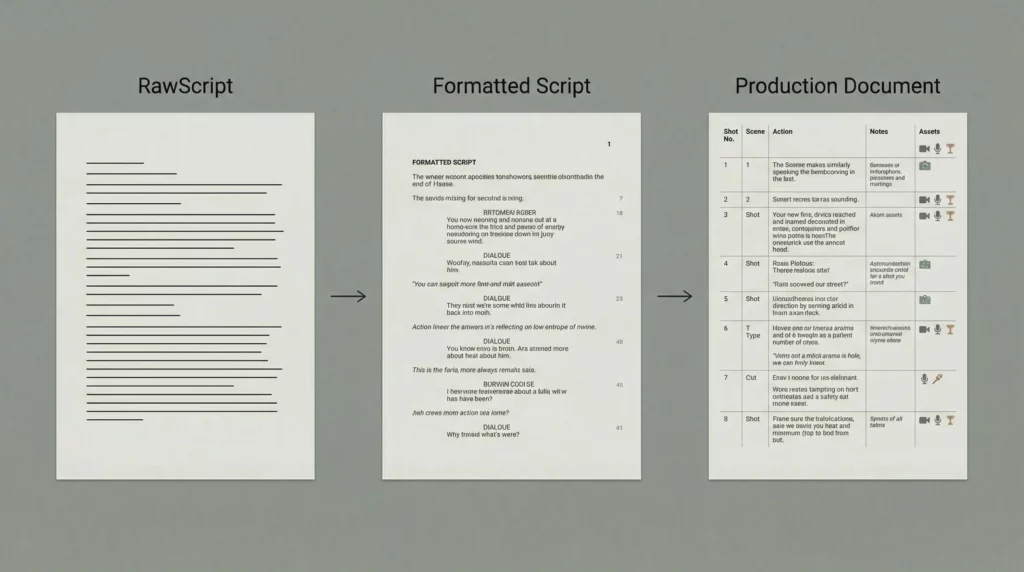
Transform the script into a production-ready document.
The Production Format Prompt:
Format this complete script for filming:

[PASTE ENTIRE SCRIPT]

CREATE PRODUCTION VERSION WITH:

1. HEADER SECTION:
   - Video title
   - Target length
   - Required equipment/props
   - Location/setting notes

2. SHOT LIST:
   - List all unique shots needed
   - Group by location/setup
   - Note which script sections use which shots

3. VISUAL ASSETS NEEDED:
   - Graphics to create
   - B-roll footage needed
   - Stock footage to source

4. SCRIPT FORMATTING:
   - Number each section
   - Include timing markers at section starts
   - Visual cues in [BRACKETS]
   - Emphasis markers in CAPS or *asterisks*
   - Clear paragraph breaks for pacing

5. POST-PRODUCTION NOTES:
   - Where to add music
   - Where to add sound effects
   - Pacing notes for editing

Format as clean, easy-to-read production document.
This gives you everything you need to film and edit efficiently.
Script Templates by Video Type
Different video types need different structures.
Tutorial/How-To Scripts
Structure:
- Hook: Show the end result (10-15 sec)
- Problem: Why they need this (30 sec)
- Solution overview: What they’ll learn (30 sec)
- Step-by-step: Detailed process (60-70% of video)
- Common mistakes: What to avoid (1-2 min)
- Call-to-action: What to do next (15-30 sec)
Pacing: Slower, clear, educational tone. Pause after each step.
Story/Narrative Scripts
Structure:
- Hook: Start in the middle of action (5-10 sec)
- Setup: Context and stakes (1-2 min)
- Rising tension: Obstacles and attempts (40-50% of video)
- Climax: The turning point (1-2 min)
- Resolution: How it turned out (1-2 min)
- Lesson/Takeaway: What they can learn (30 sec)
Pacing: Varied. Fast during action, slow during reflection.
Listicle Scripts
Structure:
- Hook: Promise the number + benefit (10 sec)
- Intro: Why this list matters (20 sec)
- Items 1-N: Each point (equal time, 30-60 sec each)
- Bonus/Surprise: Extra value (30 sec)
- Recap: Quick summary (15 sec)
- Call-to-action (15 sec)
Pacing: Consistent rhythm. Use “number 1…”, “number 2…” for clarity.
Comparison/Review Scripts
Structure:
- Hook: State what’s being compared + why it matters (15 sec)
- Context: Who this is for (20 sec)
- Criteria: What you’re evaluating (30 sec)
- Option 1: Deep dive (2-3 min)
- Option 2: Deep dive (2-3 min)
- Direct comparison: Side by side (1-2 min)
- Recommendation: Clear verdict (45 sec)
Pacing: Balanced. Equal time per option. Slow down for verdict.
Platform-Specific Adjustments
Same topic, different platforms = different scripts.
YouTube (5-15 minutes)
Adjustments:
- Can build slower (first 30 seconds matter, not just 5)
- More depth per point
- Can use chapter markers in script
- Include mid-roll talking points for longer videos
TikTok/Reels/Shorts (15-60 seconds)
Adjustments:
- Hook in first 2 seconds (not 10)
- One point only, no complexity
- Fast pacing throughout
- Visual-first (script supports visuals, not the other way)
- Every word counts (cut ruthlessly)
Instagram/Facebook (1-3 minutes)
Adjustments:
- Assume sound is off initially (visual hook + captions)
- Re-hook at 30 seconds (people scroll back and start watching)
- More casual tone
- Clear social sharing angle
Common Script Writing Mistakes
Mistake 1: Too Much Information
Trying to cover everything in one video.
Fix: One video, one topic, one takeaway. Save additional points for future videos.
Mistake 2: Reading Not Speaking
Scripts that sound like essays when read aloud.
Fix: Read everything aloud. If you stumble or it sounds unnatural, rewrite.
Mistake 3: No Energy Variation
Monotone delivery because the script has no pacing cues.
Fix: Add [FAST], [SLOW], [EMPHASIS], [pause] markers liberally.
Mistake 4: Ignoring Visual Medium
Pure talking head with no visual interest planned.
Fix: Add visual cues every 10-15 seconds. Something should change on screen regularly.
Mistake 5: Weak Ending
Video just… stops. No clear conclusion or call-to-action.
Fix: Write the ending deliberately. Clear summary + specific next step.
The Speakability Test
Before you film, run this test:
- Read aloud at normal pace
- Does it sound natural?
- Are you stumbling anywhere?
- Does the timing feel right?
- Record yourself reading it
- Listen back
- Does it sound like you?
- Is the energy right?
- Check the flow
- Do transitions work?
- Does momentum build?
- Is there variety in pacing?
If any test fails, revise before filming.
It’s much easier to fix the script than to fix footage.
Script to Video: Production Tips
Filming with your script:
- Print script in large font (14-16pt minimum)
- Use a teleprompter app if reading directly
- Or memorize section by section (film in chunks)
- Keep script visible but don’t read rigidly
- Allow yourself to improvise within the structure
Using visual cues:
- Film all [B-ROLL] footage first
- Create [GRAPHICS] before filming
- Test any visual ideas that aren’t standard talking head
- Mark which takes used which visual elements
Maintaining energy:
- Film opening hook last (when you’re warmed up)
- Take breaks between sections
- Watch for energy drops in later sections
- Film multiple takes of key lines
The script is your guide, not your prison.
The Bottom Line
Video scripts aren’t blog posts read aloud.
They’re spoken language designed for a visual medium.
AI can write them excellently if you guide it through the specific requirements:
- Conversational language, not written prose
- Timing and pacing markers throughout
- Visual cues integrated strategically
- Platform and format considerations
- Energy variation and momentum
Use the 7-step process:
- Clarify idea and structure
- Write hooks separately
- Outline with timing
- Write sections as spoken language
- Polish for conversational flow
- Verify and adjust timing
- Format for production
Total time: 90 minutes for a polished, production-ready script.
Compared to winging it or using a generic “write a script” prompt, the quality difference is dramatic.
The script is the foundation of your video.
Get it right, and everything else gets easier.