You may also like:
- Email Sequence Prompts: From Welcome to Sale in 7 Messages
- AI Prompt Builder
- How to Refine AI Content
You spent two hours writing an article.
You publish it.
Then… nothing.
One piece of content. One format. One distribution channel.
That’s a waste.
Here’s what smart content creators do:
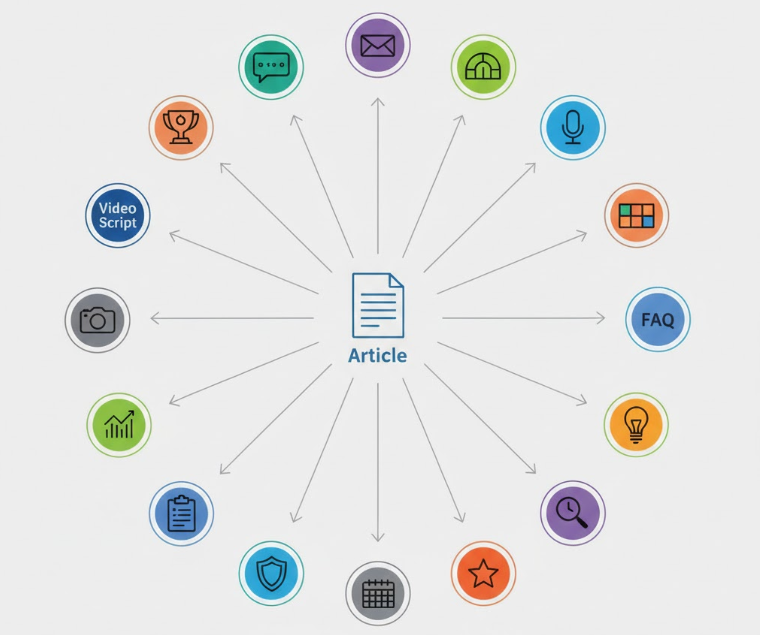
They take one article and turn it into 20 different formats.
Same core content. Different platforms. Different audiences. Different formats.
AI makes this insanely fast.
Today, you’ll learn the exact process for repurposing one article into 20 usable pieces.
No more creating from scratch every single time.
Let’s multiply your content.
Why Repurposing Multiplies Your Results
You already did the hard work.
You researched. You wrote. You edited.
Why only use that work once?
The math:
- Writing one article from scratch: 2 hours
- Repurposing it into 20 formats with AI: 60 minutes
- Total content created: 21 pieces
That’s 21 pieces in 3 hours instead of 42 hours creating each separately.
But it’s not just about speed.
Different people consume content differently:
- Some prefer reading long articles
- Some want quick social posts
- Some watch videos
- Some listen to audio
- Some save infographics
One article in 20 formats reaches 20x more people.
Same message. More reach. Better ROI.
The 20 Format Framework
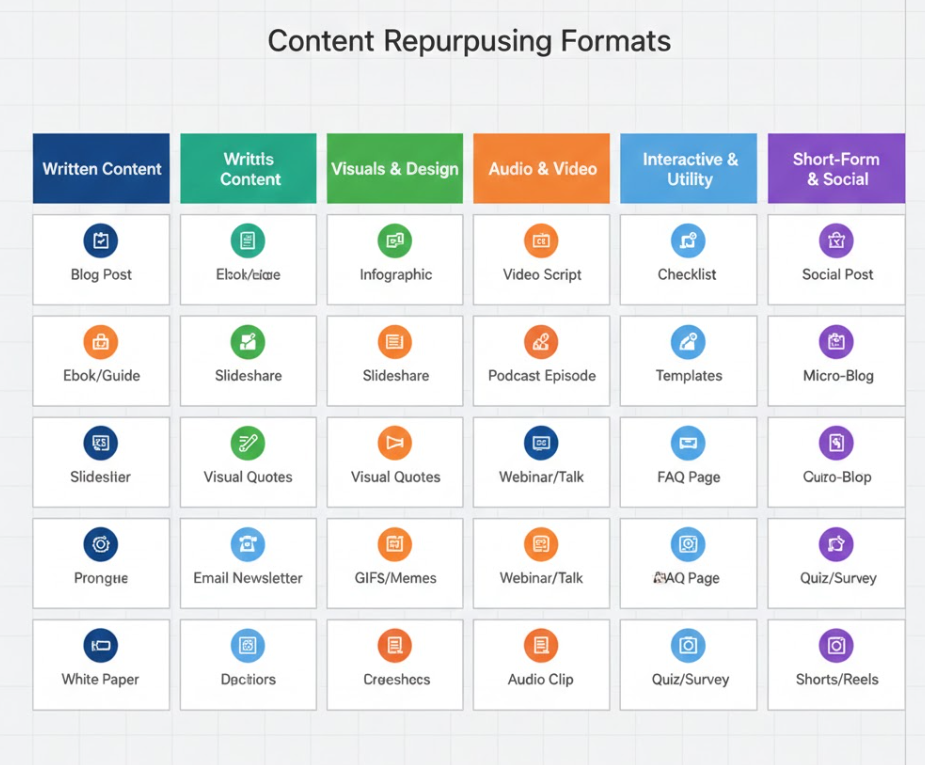
Here are the 20 formats you can create from one article.
I’ve organized them into five categories.
Category 1: Social Media (7 formats)
- Twitter/X thread (8-12 tweets)
- LinkedIn post (100-150 words)
- Instagram carousel (7-10 slides)
- Facebook post (75-100 words)
- Twitter/X single quotes (5-7 standalone tweets)
- LinkedIn carousel (PDF slides)
- Pinterest pin description (with title)
Category 2: Email Content (3 formats)
- Newsletter feature (300-400 words)
- Email sequence (3-5 emails)
- Quick tip email (150-200 words)
Category 3: Video/Audio (3 formats)
- YouTube script (5-7 minutes)
- Short-form video script (60-90 seconds)
- Podcast outline (talking points)
Category 4: Visual Content (4 formats)
- Infographic outline (key stats and flow)
- Quote graphics (5-7 pull quotes)
- Comparison chart (if applicable)
- Process diagram (step-by-step visual)
Category 5: Alternative Text (3 formats)
- Executive summary (150-200 words)
- FAQ section (5-7 Q&As)
- Beginner’s guide version (simplified)
Not every article works for every format.
But most articles work for at least 15 of these.
The Master Repurposing Prompt
Here’s the baseline prompt that works for most formats.
I have an article I want to repurpose into [specific format].

ORIGINAL ARTICLE:
[Paste your article - full text or key sections]

TARGET FORMAT: [Format name from the 20-format list]
TARGET PLATFORM: [Where it will be published]
TARGET AUDIENCE: [Who will see it]

REQUIREMENTS:
- Maintain the core message and key insights
- Adapt the structure for [platform] best practices
- Adjust tone for [platform] audience expectations
- Length: [Specific character/word count for format]
- Include [any format-specific elements - hashtags, CTAs, etc.]

Generate the repurposed content ready to publish.
This template works for any of the 20 formats.
Just fill in the specifics.
But let’s go deeper with format-specific prompts.
Social Media Formats (1-7)
Format 1: Twitter/X Thread
Convert this article into a Twitter/X thread.

ARTICLE: [Paste article]

THREAD REQUIREMENTS:
- 8-12 tweets total
- Tweet 1: Hook that makes people want to read the thread
- Tweets 2-10: Main points, one insight per tweet
- Final tweet: Summary + CTA
- Each tweet under 280 characters
- Natural breaks between tweets (use numbered format: 1/, 2/, etc.)
- No hashtags unless essential
- Conversational tone, not promotional

Make each tweet valuable on its own while building a cohesive thread.
Format 2: LinkedIn Post
Turn this article into a LinkedIn post.

ARTICLE: [Paste article]

LINKEDIN POST REQUIREMENTS:
- 100-150 words
- Professional but personal tone
- Hook in first 2 lines (before "see more" cutoff)
- 2-3 key takeaways from the article
- Personal insight or story (1-2 sentences)
- End with a question or CTA to encourage comments
- No hashtags or emoji overuse

Make it feel like a genuine share, not a promotion.
Format 3: Instagram Carousel
Create an Instagram carousel from this article.

ARTICLE: [Paste article]

CAROUSEL REQUIREMENTS:
- 7-10 slides
- Slide 1: Eye-catching title slide with main benefit
- Slides 2-8: One key point per slide (big text, minimal words)
- Slide 9: Quick recap or action step
- Slide 10: CTA slide
- Each slide: 5-10 words maximum
- Include design notes for each slide (colors, layout suggestions)

Caption (150 words): Expand on the carousel content with context.
Format 4-7: Quick Social Formats
For the remaining social formats (Facebook, Twitter quotes, LinkedIn carousel, Pinterest), use variations of the above prompts with platform-specific requirements:
- Facebook: Longer form (75-100 words), community-building tone
- Twitter quotes: Pull 5-7 tweetable one-liners from the article
- LinkedIn carousel: Similar to Instagram but more professional/data-focused
- Pinterest: Title (60 chars) + description (450 chars) optimized for search
Email Formats (8-10)
Format 8: Newsletter Feature
Adapt this article for my email newsletter.

ARTICLE: [Paste article]

NEWSLETTER REQUIREMENTS:
- 300-400 words (shorter than original article)
- Email-friendly tone (conversational, personal)
- Structure:
  * Opening hook (2-3 sentences)
  * Main insight from article (the "why this matters")
  * 3 key takeaways (brief bullet points or numbered list)
  * One actionable step readers can take today
  * CTA linking to full article or related resource
- Subject line options (3 variations)

Keep it scannable - busy people read newsletters on mobile.
Format 9: Email Sequence
Turn this article into a 3-email sequence.

ARTICLE: [Paste article]

SEQUENCE STRUCTURE:

EMAIL 1 (Day 1): The Problem
- Introduce the main problem from the article
- Make them feel it (this is their pain point)
- Tease the solution (tomorrow's email)
- 150-200 words

EMAIL 2 (Day 2): The Framework
- Present the solution/framework from the article
- Explain how it works
- Build desire for implementation
- 200-250 words

EMAIL 3 (Day 3): The Action Step
- Give them one specific thing to do
- Link to full article for deeper dive
- Clear CTA
- 150-200 words

Include subject lines for each email.
Format 10: Quick Tip Email
Extract one quick tip from this article for a standalone email.

ARTICLE: [Paste article]

QUICK TIP EMAIL REQUIREMENTS:
- 150-200 words total
- One specific, actionable tip
- Can be implemented in under 30 minutes
- Clear step-by-step if applicable
- Subject line that promises the quick win

This is a "give value fast" email, not a full lesson.
Video/Audio Formats (11-13)
Format 11: YouTube Script
Create a YouTube video script from this article.

ARTICLE: [Paste article]

SCRIPT REQUIREMENTS:
- 5-7 minute video (roughly 750-1000 words spoken)
- Structure:
  * Hook (first 15 seconds - why they should watch)
  * Intro (30 seconds - what they'll learn)
  * Main content (3-4 key points from article)
  * Recap (30 seconds)
  * CTA (subscribe, comment, link in description)
- Conversational spoken language (not written language)
- Include [visual cue] notes where graphics/b-roll should appear
- Pacing notes (slow down, emphasize, pause)

Write it to be SPOKEN, not read.
Format 12: Short-Form Video Script
Adapt this article into a 60-90 second short-form video script (TikTok, Reels, Shorts).

ARTICLE: [Paste article]

SCRIPT REQUIREMENTS:
- Hook in first 3 seconds (scroll-stopper)
- One main point from article (choose the strongest)
- Quick explanation (30-45 seconds)
- Payoff/conclusion (15-20 seconds)
- CTA (10 seconds)
- Include [on-screen text] suggestions
- Fast-paced, punchy delivery
- Total: 150-200 words spoken

Make every second count. No fluff.
Format 13: Podcast Outline
Create a podcast episode outline from this article.

ARTICLE: [Paste article]

OUTLINE REQUIREMENTS:
- Episode title
- Episode description (50 words for show notes)
- Talking points (not full script):
  * Opening story or hook (2-3 minutes)
  * 3-5 main segments with key points to cover
  * Stories, examples, or analogies to use
  * Listener question or challenge to address
  * Action step for listeners
- Timestamps (estimated)
- Show notes (links, resources mentioned)

This is for natural conversation, not reading a script.
Visual Content Formats (14-17)
Format 14: Infographic Outline
Create an infographic outline from this article.

ARTICLE: [Paste article]

INFOGRAPHIC REQUIREMENTS:
- Title (eye-catching, 5-8 words)
- Subtitle (15-20 words explaining value)
- 5-7 key data points, stats, or insights
- Visual flow (how information should be organized)
- Color scheme suggestion
- Icon/graphic suggestions for each section
- Footer CTA

Provide the STRUCTURE and CONTENT, not the actual design.
A designer will use this outline to create the visual.
Format 15-17: Other Visual Formats
Format 15: Quote Graphics Extract 5-7 tweetable quotes perfect for standalone graphics.
Format 16: Comparison Chart If your article compares approaches/tools/methods, structure it as a visual comparison table.
Format 17: Process Diagram If your article explains a process, outline it as a step-by-step visual flowchart.
Use similar prompts to Format 14, adjusted for each visual type.
Alternative Text Formats (18-20)
Format 18: Executive Summary
Create an executive summary of this article.

ARTICLE: [Paste article]

EXECUTIVE SUMMARY REQUIREMENTS:
- 150-200 words total
- Target: Busy decision-makers who want the essence
- Structure:
  * Problem statement (2 sentences)
  * Key finding or insight (2 sentences)
  * Recommendation or conclusion (2 sentences)
  * Next steps (1-2 sentences)
- Professional tone
- No fluff, pure signal

This is for someone who has 60 seconds to decide if they care.
Format 19: FAQ Section
Turn this article into a FAQ section.

ARTICLE: [Paste article]

FAQ REQUIREMENTS:
- 5-7 questions readers would ask about this topic
- Each answer: 50-75 words
- Questions should cover:
  * What is this?
  * Why does it matter?
  * How do I do it?
  * What if [common objection]?
  * What's next?
- Conversational tone
- Practical, actionable answers

Make it feel like a real conversation, not a corporate FAQ.
Format 20: Beginner’s Guide Version
Simplify this article for complete beginners.

ARTICLE: [Paste article]

BEGINNER'S GUIDE REQUIREMENTS:
- Assume zero prior knowledge
- Remove jargon (or explain it in simple terms)
- Add more examples and analogies
- Break complex ideas into smaller steps
- More encouraging tone ("You can do this")
- Length: Similar to original but more explanatory
- Add "Why this matters" context for each major point

Make it accessible to someone encountering this topic for the first time.
The Repurposing Workflow
Here’s how to actually do this efficiently.
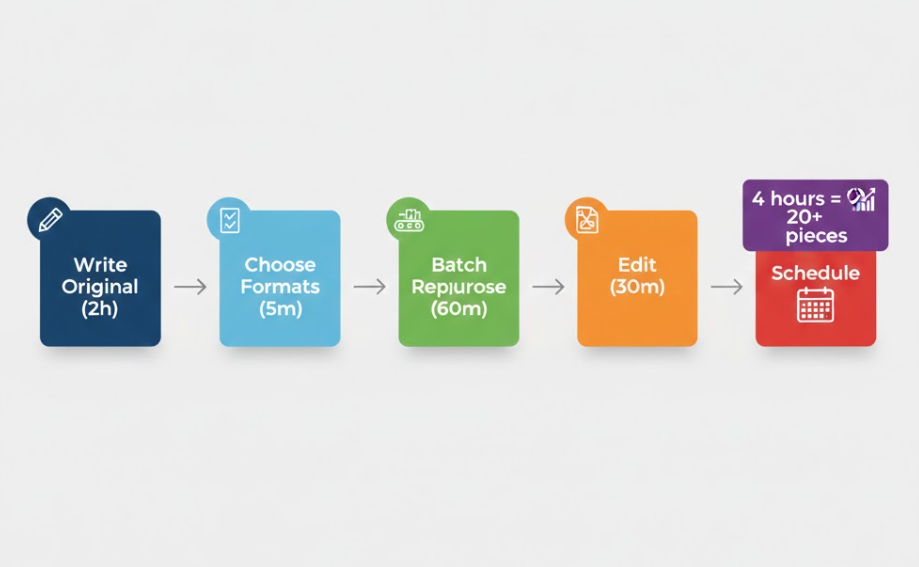
Step 1: Write the original article (2 hours)
Create your best long-form content first. This is your source material.
Step 2: Choose your formats (5 minutes)
Pick 10-15 formats that make sense for:
- Your distribution channels
- Your audience preferences
- The article topic
Not every article needs all 20 formats.
Step 3: Batch the repurposing (60 minutes)
Group similar formats together:
- All social media formats at once
- All email formats at once
- All video/audio formats at once
Run through your prompts systematically.
Step 4: Quick edit pass (30 minutes)
AI gives you 80-90% there.
Spend a few minutes on each format:
- Add your personal touch
- Fix any awkward transitions
- Ensure brand voice consistency
Step 5: Schedule everything (30 minutes)
Load all formats into your scheduling tools:
- Social posts → Buffer, Hootsuite
- Emails → Email platform
- Video scripts → Save for production
Total time: 4 hours to create 20+ pieces of content.
That’s 12 minutes per piece.
Compare that to creating each from scratch.
Platform Priority Strategy
Can’t do all 20 formats every time?
Prioritize by platform performance.
Tier 1: Always repurpose to these (if you use the platform)
- Twitter/X thread (high engagement)
- LinkedIn post (high professional reach)
- Newsletter feature (owned audience)
- YouTube script (if you do video)
Tier 2: Repurpose when you have time
- Instagram carousel (visual platforms)
- Email sequence (nurture campaigns)
- Quote graphics (easy wins)
- Executive summary (lead magnets)
Tier 3: Repurpose for specific campaigns
- Podcast outline (if you run a show)
- Infographic (big content pushes)
- Short-form video (trending topics)
Start with Tier 1. Expand to Tier 2 as you build the habit.
Repurposing Best Practices
Practice 1: Maintain Core Message
Every format should communicate the same core insight.
Different structure. Same substance.
Practice 2: Adapt, Don’t Copy-Paste
Each platform has different norms.
LinkedIn wants professional storytelling. Twitter wants punchy insights. YouTube wants conversational teaching.
The same paragraph won’t work everywhere.
Practice 3: Track What Performs
Not all formats will perform equally.
Track engagement by format:
- Which get the most clicks?
- Which drive the most conversions?
- Which build the most trust?
Double down on what works.
Practice 4: Test Different Angles
Same article, different hooks.
Your Twitter thread might focus on the tactical steps. Your LinkedIn post might focus on the strategic insight. Your email might focus on the personal story.
Same content. Different entry points.
Practice 5: Build a Repurposing Library
Save your best format variations.
When you write a new article, you already know which formats to create.
You can even save the exact prompts you used successfully.
Common Mistakes to Avoid
Mistake 1: Repurposing Bad Content
Garbage in, garbage out.
Only repurpose your best content.
If the original article isn’t good, creating 20 versions won’t help.
Mistake 2: Not Adapting for Platform
Copying your blog post directly to LinkedIn doesn’t work.
AI can help with adaptation, but you need to prompt for it.
Mistake 3: Overwhelming Your Audience
Don’t post all 20 formats on the same day.
Spread them out strategically.
Mistake 4: Forgetting CTAs
Every repurposed piece should guide readers somewhere:
- Full article
- Email list
- Product page
- Related content
Don’t repurpose without a conversion goal.
Mistake 5: No Quality Control
AI will occasionally produce awkward phrasing or miss context.
Always do a quick review before publishing.
The Bottom Line
One article. Twenty formats. Four hours of work.
That’s how you multiply your content ROI.
You’ve already done the hard part (creating the original content).
Repurposing is just smart distribution.
Use the 20-format framework.
Use the platform-specific prompts.
Follow the 5-step workflow.
Your content will reach more people, in more places, in formats they prefer.
That’s not working harder.
That’s working smarter.