You may also like:
- Negative Prompting: What NOT to Include (And Why It Matters)
- Video Script Writing with AI (From Idea to Final Draft)
- Advanced Prompt Techniques: Constraints, Personas, and Output Control
You’ve written content.
Now you need to edit it.
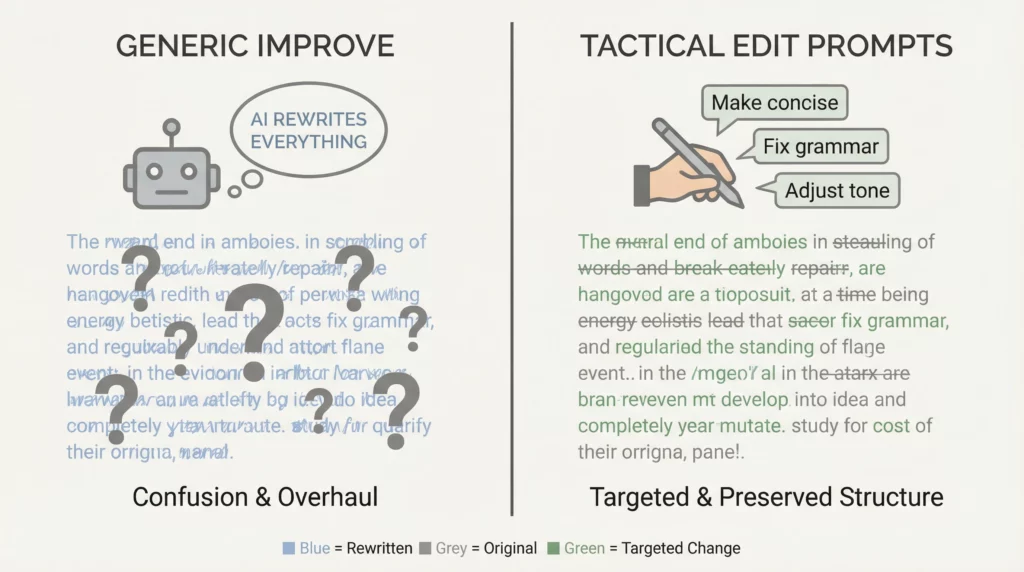
Most people ask AI: “Improve this article.”
AI rewrites everything. Changes your voice. Loses your original intent.
That’s not editing. That’s replacement.
Here’s what professional editing actually is:
Strategic improvement of existing content while preserving what works.
AI can do this brilliantly.
But only if you prompt it with surgical precision.
Today, you’ll learn the exact tactical prompts for different types of edits.
Not generic “make it better” requests.
Specific, targeted prompts that improve clarity, flow, engagement, and conversion without destroying what you already created.
This is editing as a craft.
Let’s sharpen your content.
Why “Improve This” Prompts Fail
When you ask AI to “improve” or “make this better,” you get chaos.
What goes wrong:
AI rewrites everything from scratch. Your voice disappears. Good sections get changed for no reason. Bad sections stay bad (AI doesn’t know what you were trying to say). The edit takes longer to review than writing from scratch.
The problem: You gave AI decision-making authority without direction.
The solution: Tactical editing prompts that target specific improvements.
You stay in control. AI executes precisely.
The 8 Types of Tactical Edits
Every piece of content needs different improvements.
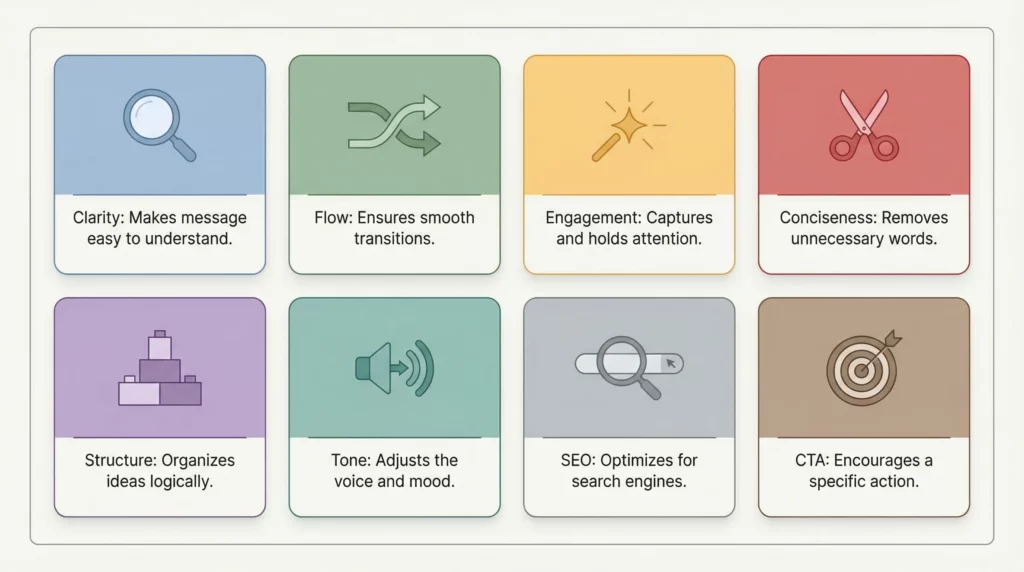
Here are the eight most valuable tactical edits, with exact prompts for each.
Edit Type 1: Clarity Enhancement
When to use: Content is technically correct but confusing or dense.
The Clarity Edit Prompt:
Review this content for clarity issues:

[PASTE CONTENT]

CLARITY ANALYSIS:
1. Identify sentences that are unnecessarily complex
2. Find jargon or technical terms that need simpler explanation
3. Locate points that jump logic (missing connecting steps)
4. Flag anywhere the reader might ask "wait, what?"

For each clarity issue:
- Quote the problematic text
- Explain why it's unclear
- Suggest a clearer version

RULES:
- Preserve my voice and style
- Only change what's actually confusing
- Keep all key information
- Make suggestions, don't rewrite the whole piece
What this does: AI identifies specific unclear spots without changing everything.
You review suggestions and accept/reject based on whether they improve clarity.
Edit Type 2: Flow Improvement
When to use: Content jumps around. Transitions are abrupt. Sections feel disconnected.
The Flow Edit Prompt:
Analyze the flow and transitions in this content:

[PASTE CONTENT]

FLOW ANALYSIS:
1. Where do ideas jump without proper connection?
2. Which transitions between paragraphs/sections feel abrupt?
3. Where does the logical sequence break down?
4. Are there any sections in the wrong order?

For each flow issue:
- Identify the exact location
- Explain what's wrong with the current flow
- Suggest either:
  * A better transition sentence
  * A reordering of sections
  * A bridge paragraph if needed

Don't rewrite content. Focus only on connecting existing pieces smoothly.
What this does: AI acts as a flow consultant, not a rewriter.
You get specific transition fixes, not a complete overhaul.
Edit Type 3: Engagement Boost
When to use: Content is clear but boring. Readers will understand but won’t stay engaged.
The Engagement Edit Prompt:
This content is clear but lacks engagement. Identify opportunities to make it more compelling:

[PASTE CONTENT]

ENGAGEMENT OPPORTUNITIES:
1. Where can I add a specific example or story?
2. Where would a question engage the reader?
3. Which paragraphs are too long and monotonous?
4. Where can I add variety in sentence structure?
5. Where would bold statements or surprising facts hook attention?

For each opportunity:
- Mark the location
- Suggest what type of engagement element to add
- Provide a specific example of how to add it

Keep my voice. Add energy without changing the message.
What this does: AI finds boring spots and suggests specific fixes.
You decide which engagement tactics fit your style.
Edit Type 4: Conciseness Cut
When to use: Content is too long. Has fluff. Says the same thing multiple ways.
The Conciseness Edit Prompt:
This content needs to be more concise without losing value.

[PASTE CONTENT]

TARGET: Cut by approximately [20%, 30%, 40%] while keeping all key points.

IDENTIFY FOR CUTTING:
1. Redundant phrases (saying the same thing twice)
2. Filler words and phrases ("in order to," "the fact that," "it is important to note")
3. Unnecessary qualifiers ("very," "really," "quite")
4. Repetitive examples (one example is enough)
5. Entire sentences that don't add new information

For each suggested cut:
- Quote what to remove
- Confirm it doesn't remove essential information
- Provide the tighter version

Show me a before/after word count.
What this does: AI identifies what can be cut without losing meaning.
You maintain control over what stays and what goes.
Edit Type 5: Structure Strengthening
When to use: Content has good information but weak organization. No clear hierarchy.
The Structure Edit Prompt:
Analyze the structure and organization of this content:

[PASTE CONTENT]

STRUCTURE ANALYSIS:
1. Does the current structure support the main message?
2. Are headers/subheaders used effectively?
3. Is there a clear hierarchy of ideas?
4. Would bullet points or numbered lists improve any sections?
5. Are related ideas grouped together?

RECOMMENDATIONS:
- Suggest header additions/changes
- Identify where lists would help
- Recommend any reordering of sections
- Point out buried key points that should be more prominent

Don't rewrite. Just suggest structural improvements.
What this does: AI evaluates organization without changing your words.
You get an architecture consultant, not a ghost writer.
Edit Type 6: Tone Adjustment
When to use: Content has the right information but wrong tone for the audience.
The Tone Edit Prompt:
This content is written for [CURRENT TONE: formal, casual, technical, etc.]
But my audience needs [TARGET TONE: conversational, professional, friendly, etc.]

[PASTE CONTENT]

TONE ADJUSTMENT:
Identify specific words, phrases, and sentences that feel wrong for the target audience.

For each tone mismatch:
- Quote the problematic text
- Explain why it doesn't fit the target tone
- Suggest an alternative that maintains the same meaning

EXAMPLES OF TARGET TONE:
- Instead of: "One must consider the implications..."
- Use: "Here's what this means for you..."

Keep all information. Adjust only the delivery.
What this does: AI helps you match content to audience without losing substance.
You see exactly which phrases need tone shifts.
Edit Type 7: SEO Optimization
When to use: Content is good but not optimized for search.
The SEO Edit Prompt:
Optimize this content for SEO without sacrificing readability:

[PASTE CONTENT]

TARGET KEYWORD: [Your keyword]
SECONDARY KEYWORDS: [Related terms]

SEO IMPROVEMENTS:
1. Where can I naturally incorporate the target keyword?
2. Where do secondary keywords fit without forcing?
3. Are headers descriptive enough for search intent?
4. Where can I add internal link opportunities? (mark with [LINK])
5. Does the opening paragraph clearly match search intent?

RULES:
- Never keyword stuff
- Every suggestion must read naturally
- Prioritize reader experience over keyword density
- Don't change meaning to fit keywords

Suggest specific additions/changes with before/after examples.
What this does: AI finds natural SEO opportunities without making content robotic.
You maintain quality while improving visibility.
Edit Type 8: Call-to-Action Strengthening
When to use: Content educates but doesn’t guide readers to action.
The CTA Edit Prompt:
This content needs stronger calls-to-action:

[PASTE CONTENT]

CURRENT STATE:
- What action do I want readers to take?
- Where are the current CTAs (if any)?
- Why might readers not act after reading this?

CTA IMPROVEMENTS:
1. Where should CTAs be placed?
2. What should each CTA say specifically?
3. How can I make the next step clearer?
4. Where can I add motivation to act?
5. Should I have multiple CTAs or one strong one?

For each suggestion:
- Identify placement
- Write specific CTA copy
- Explain why it works

Keep it helpful, not pushy.
What this does: AI identifies where and how to guide readers to action.
You get strategic CTA placement without aggressive selling.
The Tactical Editing Workflow
Don’t run all eight edits at once.
Use this prioritized workflow:
Round 1: Foundation Edits (Must-Fix)
- Clarity Enhancement (if content is confusing)
- Structure Strengthening (if organization is weak)
- Flow Improvement (if transitions are rough)
Run these first. They affect everything else.
Round 2: Quality Edits (Should-Fix) 4. Conciseness Cut (if it’s too long) 5. Engagement Boost (if it’s boring) 6. Tone Adjustment (if voice is wrong)
These improve quality without changing foundation.
Round 3: Optimization Edits (Nice-to-Fix) 7. SEO Optimization (if you need search traffic) 8. CTA Strengthening (if you need conversions)
These maximize impact of already-good content.
Time investment:
- Round 1: 20-30 minutes
- Round 2: 15-20 minutes
- Round 3: 10-15 minutes
- Total: 45-65 minutes for thorough tactical editing
Compare this to “improve this” approach: 2+ hours of reviewing complete rewrites and trying to salvage what you originally wrote.
The Precision Edit Technique
For extremely targeted edits, use this micro-level prompt:
The Precision Edit Prompt:
I need help with this specific paragraph:

[PASTE SINGLE PARAGRAPH]

SPECIFIC ISSUE: [Describe exactly what's wrong]
- "This paragraph is too abstract, needs concrete example"
- "This transition is abrupt, need better bridge"
- "This sentence is confusing, but I'm not sure why"
- "This feels too formal for my audience"

FIX ONLY THIS ISSUE. Don't change anything else.

Provide:
1. What's causing the problem
2. Your suggested fix
3. The rewritten paragraph with ONLY that issue fixed
When to use this:
- You know exactly what’s wrong but not how to fix it
- You want surgical precision, not broad changes
- You’re happy with 95% of content but stuck on specific spots
This is professional-level editing control.
The Before/After Comparison Method
Always review edits in comparison format.
The Comparison Prompt:
Show me a before/after comparison for these edits:

ORIGINAL: [Paste original text]

SUGGESTED EDITS: [Paste AI's suggestions]

FORMAT AS:
[BEFORE]
Original text here

[AFTER]
Edited version here

[CHANGES MADE]
- Bullet list of specific changes
- Explanation of why each change improves the content

This lets me see exactly what changed and decide if I agree.
Why this matters: You see changes side-by-side. You understand reasoning behind each edit. You can accept some suggestions and reject others. You stay in control.
Editing Different Content Types
Different content needs different edit priorities.
Blog Posts
Priority edits:
- Structure Strengthening (scannable hierarchy)
- SEO Optimization (search visibility)
- Engagement Boost (keep readers on page)
Sales/Landing Pages
Priority edits:
- Clarity Enhancement (message must be crystal clear)
- CTA Strengthening (conversion is everything)
- Conciseness Cut (every word must earn its place)
Email Content
Priority edits:
- Conciseness Cut (people skim emails)
- Tone Adjustment (match relationship level)
- CTA Strengthening (one clear action)
Social Media Posts
Priority edits:
- Engagement Boost (hook matters most)
- Conciseness Cut (platform constraints)
- Tone Adjustment (match platform culture)
Long-Form Guides
Priority edits:
- Flow Improvement (maintain momentum over length)
- Structure Strengthening (clear progression)
- Clarity Enhancement (complexity needs clarity)
Common Editing Mistakes to Avoid
Mistake 1: Accepting All Suggestions Blindly
AI suggestions aren’t always right.
Fix: Review each suggestion individually. Ask “Does this actually improve it?”
Mistake 2: Editing Everything at Once
Trying to fix clarity, flow, tone, and SEO simultaneously creates confusion.
Fix: Use the three-round workflow. One edit type at a time.
Mistake 3: Losing Your Voice
AI’s “improvements” sometimes homogenize your unique style.
Fix: Explicitly say “preserve my voice” in every prompt. Check if rewrites still sound like you.
Mistake 4: Over-Editing
Changing things that don’t need changing.
Fix: If something works, leave it alone. Edit to improve, not to change.
Mistake 5: No Version Control
Losing your original after accepting too many edits.
Fix: Save original. Make edits in a copy. Compare side by side.
The Edit Quality Checklist
Before finalizing edits, verify:
Did the edit improve:
- [ ] Clarity (is it easier to understand?)
- [ ] Flow (does it read more smoothly?)
- [ ] Engagement (is it more interesting?)
- [ ] Conciseness (tighter without losing value?)
- [ ] Structure (better organized?)
- [ ] Tone (better match to audience?)
Did the edit preserve:
- [ ] My original voice
- [ ] Key information
- [ ] Main message
- [ ] Specific examples that work
- [ ] Unique insights
If any preservation checkbox is unchecked, the edit went too far.
Dial it back.
The 80/20 Editing Principle
Not all content needs all edits.
The 20% that creates 80% improvement:
- Fix actual clarity problems
- Strengthen weak transitions
- Cut obvious fluff
- Add one good example where missing
These four edits improve most content dramatically.
The other edits are refinement.
Start with the 20%. See if you need more.
Often, you don’t.
The Bottom Line
AI editing isn’t “make this better.”
It’s tactical, targeted, precision improvement.
Eight types of edits:
- Clarity Enhancement (fix confusion)
- Flow Improvement (smooth connections)
- Engagement Boost (add energy)
- Conciseness Cut (remove fluff)
- Structure Strengthening (organize better)
- Tone Adjustment (match audience)
- SEO Optimization (improve visibility)
- CTA Strengthening (guide action)
Use the three-round workflow:
- Round 1: Foundation (clarity, structure, flow)
- Round 2: Quality (conciseness, engagement, tone)
- Round 3: Optimization (SEO, CTA)
Keep control with:
- Specific edit prompts (not generic “improve”)
- Before/after comparisons
- Targeted changes (not complete rewrites)
- Voice preservation rules
Your content improves systematically.
Your voice stays intact.
That’s professional editing.