You may also like:
- Advanced Prompt Techniques
- Negative Prompting: What NOT to Include (And Why It Matters)
- Context Windows Explained – How Much Information Can AI Actually Remember
You’ve been using AI to create content.
But here’s a question most affiliate marketers never ask.
Why does AI sometimes sound boring and robotic? And other times unpredictable and all over the place?
The answer isn’t your prompt.
It’s the settings running underneath it.
AI models have parameters that control how they think and respond.
Temperature is the most important one.
Understanding it changes everything about the quality and consistency of your output.
Today, we’re breaking it down in plain English.
No computer science degree required.
Let’s go.
What Even Is “Temperature”?
Forget the technical definition for a second.
Here’s a real-world analogy.
Think of your AI as a writer sitting in a room full of word options.
At low temperature, that writer is cautious. They pick the most obvious, expected word every time. Safe. Predictable. Accurate.
At high temperature, that same writer gets a bit wild. They reach for surprising, unusual, creative word choices. Sometimes brilliant. Sometimes off the wall.
Temperature is simply a dial that controls how adventurous or conservative the AI is when generating text.
It typically ranges from 0 to 2.
0 = completely predictable, almost robotic 1 = balanced, natural-sounding 2 = highly creative, occasionally chaotic
Most AI tools default somewhere around 0.7 to 1.0.
That’s intentional. It’s the sweet spot for general use.
But YOU can understand this and use it to your advantage.

The Technical Bit (Kept Simple)
Okay, let’s go one level deeper.
Still no jargon. Promise.
When AI generates text, it doesn’t just pick the next word randomly.
It calculates a probability for every possible next word.
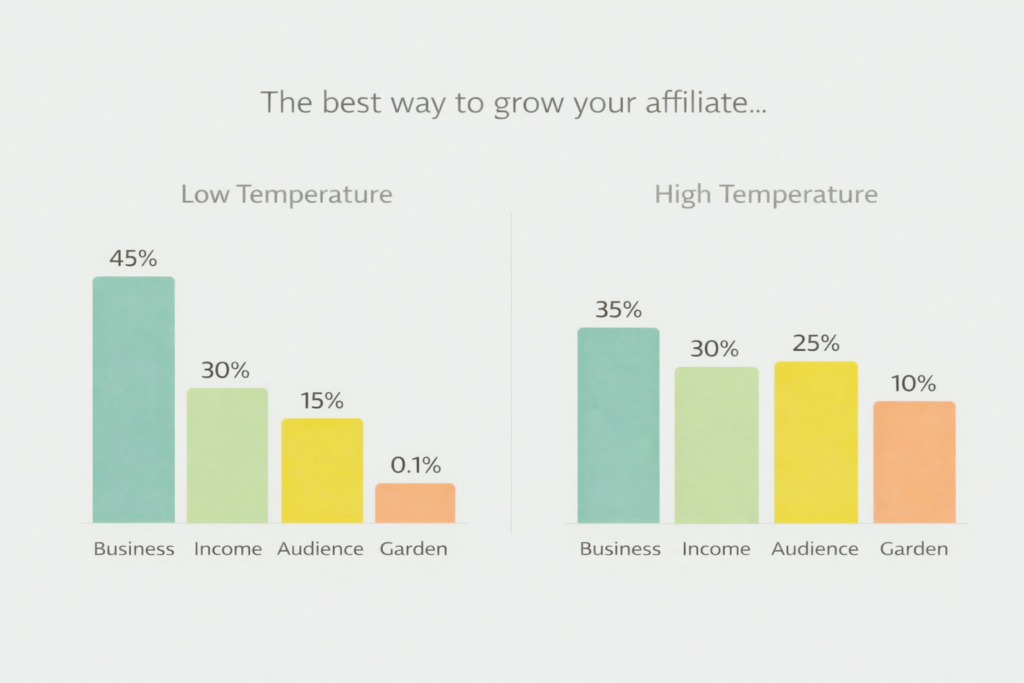
Example: You type “The best way to grow your affiliate”…
AI might calculate:
- “business” → 45% likely
- “income” → 30% likely
- “audience” → 15% likely
- “garden” → 0.1% likely
At low temperature, AI almost always picks “business.”
The highest probability word. Every time.
At high temperature, AI might occasionally pick “income” or “audience.” Rarely, something unexpected slips through.
That’s it.
That’s all temperature does.
It adjusts how strictly AI follows probability.
Low = stick to the obvious.
High = explore alternatives.
Why does this matter for your content?
Because different content needs different levels of exploration.
A legal disclaimer needs low temperature.
Accuracy above all else.
A creative tagline needs higher temperature.
Surprise and originality matter.
The Parameters Beyond Temperature
Temperature gets all the attention. But it has friends.
Here are the other key parameters and what they actually do.
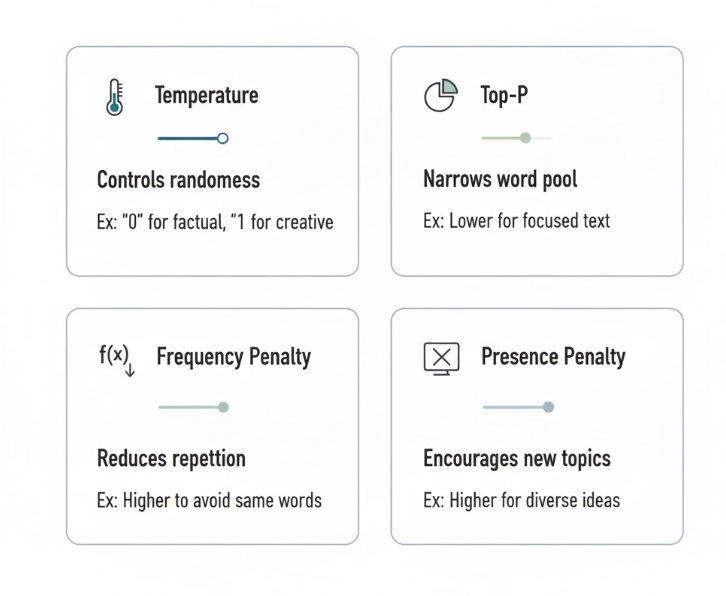
Top-P (Also Called Nucleus Sampling)
This one works alongside temperature.
Think of it as a “consideration pool.”
Top-P of 0.9 means: “Only consider word options that together make up 90% of the probability.”
AI ignores the remaining 10% (the outliers, the weird stuff).
Top-P of 0.5 means: “Only consider the top 50% of options.” Much more conservative.
The practical difference:
High Top-P = more diverse vocabulary, varied phrasing, unexpected word combinations.
Low Top-P = tighter vocabulary, consistent phrasing, reliable patterns.
For affiliate content: Keep Top-P around 0.9 for natural-sounding writing. Drop to 0.7 when you need consistency across multiple pieces.
Top-K
Similar idea, different method.
Top-K limits how many word options AI considers at all.
Top-K of 50 means: Only consider the 50 most likely next words. Ignore everything else.
Top-K of 10 means: Only consider the 10 most likely words. Very focused.
When to think about this:
If your AI output feels repetitive or uses the same phrases over and over, the Top-K is probably set low.
If it feels unpredictable or inconsistent, Top-K may be too high.
Frequency Penalty
This one is pure gold for affiliate marketers.
Frequency Penalty reduces how often AI repeats words or phrases it has already used.
Higher frequency penalty = more vocabulary variety, fewer repetitions.
Lower frequency penalty = AI comfortably repeats words it already used.
Practical example:
Without frequency penalty, AI might write “affiliate” seven times in one paragraph.
With high frequency penalty, it finds alternatives: “partner program,” “commission structure,” “referral deal.”
This makes content sound more human-written and less repetitive.
Presence Penalty
Related but different.
Presence Penalty discourages AI from revisiting topics it has already covered.
High presence penalty = AI keeps introducing new ideas, broad coverage.
Low presence penalty = AI goes deep on fewer topics.
When to use each:
High presence penalty → listicles, roundups, broad guides (you want variety)
Low presence penalty → in-depth tutorials, detailed reviews (you want depth)
What This Looks Like in Real Content
Enough theory. Let’s see how parameters actually affect your affiliate content.
Scenario 1: Writing a Product Review
Goal: Accurate, trustworthy, specific review.
Ideal settings:
- Temperature: 0.5-0.7 (controlled, factual)
- Top-P: 0.85 (natural language, slight variety)
- Frequency Penalty: 0.6 (avoid repeating product name constantly)
- Presence Penalty: 0.3 (go deep on key points, don’t jump around)
What happens: Your review stays on topic. Sentences are clear. Facts are presented accurately. The same word isn’t used five times in a row.
What NOT to do: High temperature on product reviews. You’ll get creative claims that sound invented, inconsistent tone, and occasional factual drift.
Scenario 2: Writing Email Subject Lines
Goal: Creative, compelling, stands out in inbox.
Ideal settings:
- Temperature: 1.0-1.3 (let creativity flow)
- Top-P: 0.95 (explore wider vocabulary)
- Frequency Penalty: 0.8 (each subject line sounds distinct)
- Presence Penalty: 0.7 (different angle on each option)
What happens: AI generates genuinely varied subject lines with different hooks, angles, and energy. You get real options to choose from, not five versions of the same thing.
What NOT to do: Low temperature on creative tasks. You’ll get five subject lines that all say essentially the same thing in slightly different words.
Scenario 3: Writing a Comparison Article
Goal: Balanced, structured, covers all products fairly.
Ideal settings:
- Temperature: 0.6-0.8 (structured thinking)
- Top-P: 0.85 (consistent writing style)
- Frequency Penalty: 0.5 (some repetition is fine—same product names needed)
- Presence Penalty: 0.5 (equal depth per product)
What happens: Each product gets similar treatment. Tone stays consistent throughout. The structure holds without drifting.
Scenario 4: Writing Taglines and Headlines
Goal: Memorable, punchy, creative.
Ideal settings:
- Temperature: 1.2-1.5 (maximum creativity)
- Top-P: 0.97 (widest vocabulary pool)
- Frequency Penalty: 0.9 (every option sounds fresh)
- Presence Penalty: 0.9 (totally different concepts each time)
What happens: AI surprises you. Some ideas are unusable. But a few will be genuinely brilliant. That’s the tradeoff at high temperature.
Pro tip: Generate 20 taglines at high temperature. You’ll find 2-3 that are exceptional. That’s the strategy.
[Image suggestion: Four horizontal rows, one per scenario. Each row shows: content type (icon), temperature dial position, and a sample output excerpt. Color-coded by temperature range: blue for low, yellow for medium, orange for high]
How to Actually Change These Settings
Here’s where it gets practical.
Different AI tools give you different levels of control.
ChatGPT / Claude (Consumer Versions)
These interfaces don’t show you raw parameter sliders.
But you can influence temperature behavior through your prompt.
Simulate low temperature: “Be precise and factual. Use the most obvious, straightforward phrasing. Avoid creative language. Prioritize accuracy over style.”
Simulate high temperature: “Be creative and unexpected. Explore unusual word choices. Surprise me with fresh angles. Don’t default to the obvious phrasing.”
Simulate low frequency penalty: “It’s fine to reuse key terms throughout. Consistency in language matters more than variety.”
Simulate high frequency penalty: “Vary your vocabulary deliberately. Find alternatives to words you’ve already used. Avoid any word appearing more than twice.”
You’re not changing the code. But you’re pushing behavior in the same direction.
API Access (For Advanced Users)
If you’re using the Anthropic API, OpenAI API, or similar, you can set parameters directly.
Example in a basic API call structure:
model: "claude-sonnet"
temperature: 0.7
top_p: 0.9
max_tokens: 1000
frequency_penalty: 0.5
This gives you precise, repeatable control.
Same prompt + same settings = consistent output every time.
For affiliate marketers who produce content at scale, this is powerful.
You build a prompt that works. You lock in parameters. You replicate.
Third-Party AI Writing Tools
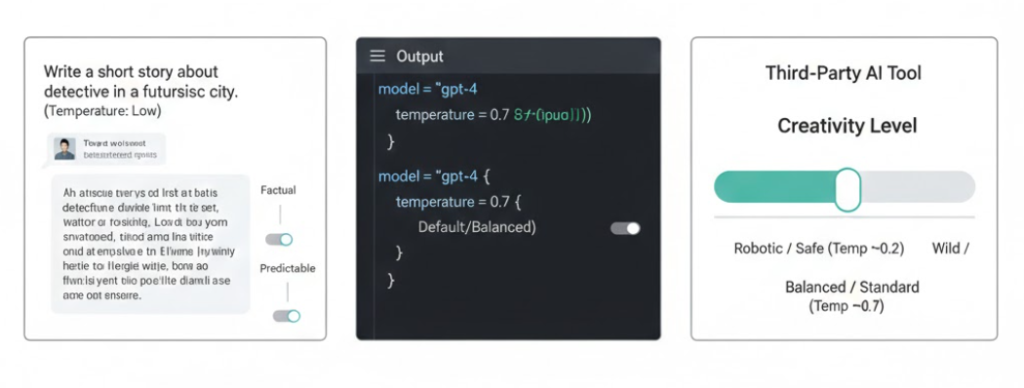
Tools like Jasper, Copy.ai, and similar platforms often expose these settings as sliders or “creativity” controls.
“Creativity level: 1-5” is often just temperature dressed up with a friendlier label.
Low creativity = low temperature. High creativity = high temperature.
Now you know what’s actually happening behind that slider.
The Temperature Sweet Spots Cheat Sheet
Here’s your quick reference guide.
0.0 – 0.3: Ultra-Conservative Best for: Legal text, disclaimers, technical specifications, data tables Avoid for: Anything requiring natural language or personality
0.4 – 0.6: Focused and Reliable Best for: Tutorials, how-to guides, factual product descriptions, FAQ sections Avoid for: Creative copy, social media posts, email subject lines
0.7 – 0.9: Natural and Balanced Best for: Blog articles, product reviews, email body copy, comparison guides This is: The default zone for most general writing tasks
1.0 – 1.2: Creative and Expressive Best for: Email subject lines, ad copy, social media captions, introductions Watch for: Occasional factual drift, needs light review
1.3 – 1.5: Experimental Territory Best for: Brainstorming, taglines, campaign concepts, naming ideas Watch for: Inconsistency, occasional nonsense, requires heavy curation
1.6 – 2.0: Unpredictable Zone Best for: Almost nothing practical in affiliate marketing Occasionally useful for: Generating 50+ wild ideas and finding the one gem
[Image suggestion: Vertical thermometer/temperature gauge with color gradient from blue (cold/low) to red (hot/high). Each temperature range labeled with use cases on the right side. Simple, clean, highly scannable]
Common Mistakes Affiliate Marketers Make
Mistake 1: Using Default Temperature for Everything
Default settings are designed for general use.
They’re not optimized for your specific content type.
A product review needs different settings than a tagline brainstorm.
Start being intentional about this.
Mistake 2: Going Too High for Factual Content
High temperature on product specs, pricing, and features is a mistake.
AI starts hallucinating. Details shift. Numbers get fuzzy.
Keep anything factual at 0.7 or below.
Mistake 3: Going Too Low for Creative Tasks
Low temperature kills creative copy.
Your email subject lines all sound the same. Your headlines are forgettable. Your ads blend in.
Don’t play it safe when standing out is the whole point.
Mistake 4: Ignoring Frequency Penalty
This one is underused and underrated.
If your AI content sounds repetitive, frequency penalty is the fix.
Bump it up. Immediately more variety in vocabulary.
Mistake 5: Expecting Consistency Without Fixed Parameters
You run the same prompt three times and get three very different results.
That’s not random bad luck. That’s unfixed temperature.
If consistency matters (and in affiliate content, it usually does), use API access or explicit prompting to lock down your settings.
Advanced Application: Parameter Chaining
Remember prompt chaining from an earlier article?
Parameters chain too.
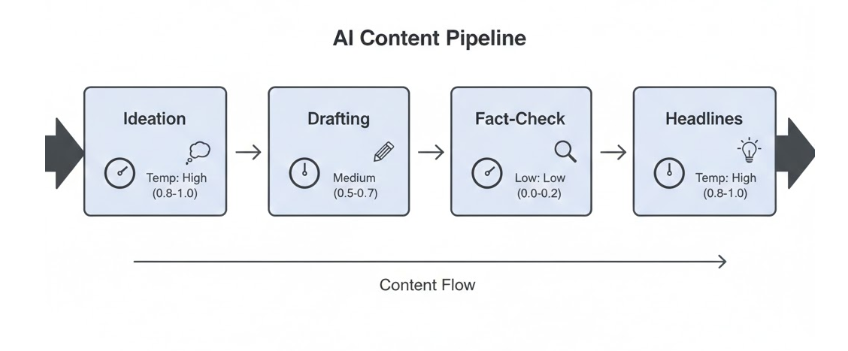
Step 1: High temperature for idea generation Generate 15 product review angles. Temperature: 1.2
Step 2: Medium temperature for drafting Pick the best angle. Write the full review. Temperature: 0.8
Step 3: Low temperature for fact-checking pass Review and correct any factual claims. Temperature: 0.4
Step 4: Medium-high temperature for headline options Generate 10 title variations. Temperature: 1.1
Same content. Different parameters at each stage.
Each stage optimized for its specific job.
This is professional-level content production.
Putting It All Together
You now understand something most affiliate marketers don’t.
AI isn’t a single setting.
It’s a system with dials.
Temperature controls creativity vs. accuracy. Top-P controls vocabulary breadth. Frequency Penalty controls word repetition. Presence Penalty controls topic repetition.
You don’t need to obsess over every number.
But you do need to think about what your content requires.
Factual content → turn the dial down. Creative content → turn the dial up. Repetitive output → raise frequency penalty. Content that spirals off-topic → lower presence penalty.
Start noticing the quality difference.
Then start being intentional about your settings.
That’s when your AI content production becomes a real system.
Not just a guessing game.
Your Action Plan
This week:
Test the same prompt at three temperature levels: 0.5, 0.9, and 1.3.
Use a product review as your test case.
Notice what changes. Notice what gets better and what gets worse.
Next week:
Match your temperature to your content type deliberately.
Creative tasks get higher settings. Factual tasks get lower settings.
This month:
If you’re on the API, start setting parameters explicitly in your workflow.
Build a reference sheet with your ideal settings for each content type you regularly produce.
The Bottom Line
Temperature isn’t just a technical setting for developers.
It’s a creative control for anyone who uses AI seriously.
The affiliate marketers producing better content faster aren’t using magic prompts.
They understand the engine underneath.
Now you do too.
Use that knowledge intentionally.
Your content will be sharper, more consistent, and more creative in exactly the right places.
That’s not luck. That’s parameters.