You may also like:
- Creating Social Media Content in Bulk – The Batch Prompting Method
- Free AI Prompt Builder for Affiliate Marketing Beginners
- The Role-Task-Context Framework (With 15 Examples)
You just got your first AI response.
And it’s… okay.
Not terrible. Not great. Just okay.
Most people stop here.
They either use the mediocre content as-is, or they start over with a completely new prompt.
Both approaches waste time and leave results on the table.
There’s a better way: iteration.
Today, you’ll learn how to turn “okay” AI outputs into exactly what you need through simple conversation.
No complex prompts required.
Let’s dive in.
What Is the Iteration Method?
Think of AI like a smart assistant who’s eager to help but needs feedback.
You wouldn’t expect them to nail it perfectly on the first try, right?
Same with AI.
The iteration method is simple: you have a conversation.
You ask. AI responds. You refine. AI improves.
Each exchange gets you closer to perfect output.
It’s not about writing the perfect prompt upfront.
It’s about working together to get there.

Why Iteration Works Better Than Perfect Prompts
Here’s what most beginners get wrong.
They think they need to write a massive, detailed prompt that covers everything.
They spend 20 minutes crafting the “perfect” prompt.
Then they get frustrated when the output still isn’t right.
Sound familiar?
Iteration flips this approach.
Old way:
- Spend 20 minutes writing detailed prompt
- Get one response
- Start over if it’s not perfect
Iteration way:
- Spend 2 minutes on basic prompt
- Get initial response
- Spend 10 minutes refining through conversation
- End up with exactly what you need
You save time and get better results.
Plus, you learn what works as you go.
The Basic Iteration Framework
Here’s the simple framework you’ll use for every piece of content.
Step 1: Start Broad
Give AI a basic request without overthinking it.
Don’t worry about getting everything perfect.
Example: “Write a product review for [noise-canceling headphones].”
That’s it. No 500-word prompt needed.
Step 2: Review What You Got
Read the output quickly.
Ask yourself:
- What’s working?
- What’s missing?
- What needs to change?
Don’t edit the content yourself yet.
Just identify the issues.
Step 3: Give Specific Feedback
Tell AI exactly what to adjust.
Be specific, not vague.
Bad feedback: “Make it better.”
Good feedback: “The review is too technical. Rewrite it for someone who’s never used noise-canceling headphones before. Use simpler language and explain what noise-canceling actually does.”
Step 4: Iterate Until It’s Right
Keep refining until the output matches your vision.
Usually takes 2-4 rounds.
Each round gets you closer.

Real Example: Iterating a Product Review
Let’s walk through a real iteration process.
Your Initial Prompt: “Write a review of the Sony WH-1000XM5 headphones.”
AI’s First Response: [Generic 300-word review with specs, features, pros/cons]
Not bad, but not what you need for your affiliate site.
Iteration #1: “This is too formal. Rewrite it like you’re recommending these headphones to a friend. Also, focus more on the actual experience of using them, not just specs.”
AI’s Second Response: [More conversational, better focus on user experience]
Getting better. But still missing something.
Iteration #2: “Good improvement. Now add a specific example of when these headphones really shine. Maybe a commute scenario or working from a noisy coffee shop.”
AI’s Third Response: [Includes relatable scenario, conversational tone, experience-focused]
Almost there.
Iteration #3: “Perfect tone and content. Now make it shorter—about 400 words max. Also, add a section at the end about who should NOT buy these headphones.”
AI’s Final Response: [Exactly what you need: conversational, example-driven, honest, right length]
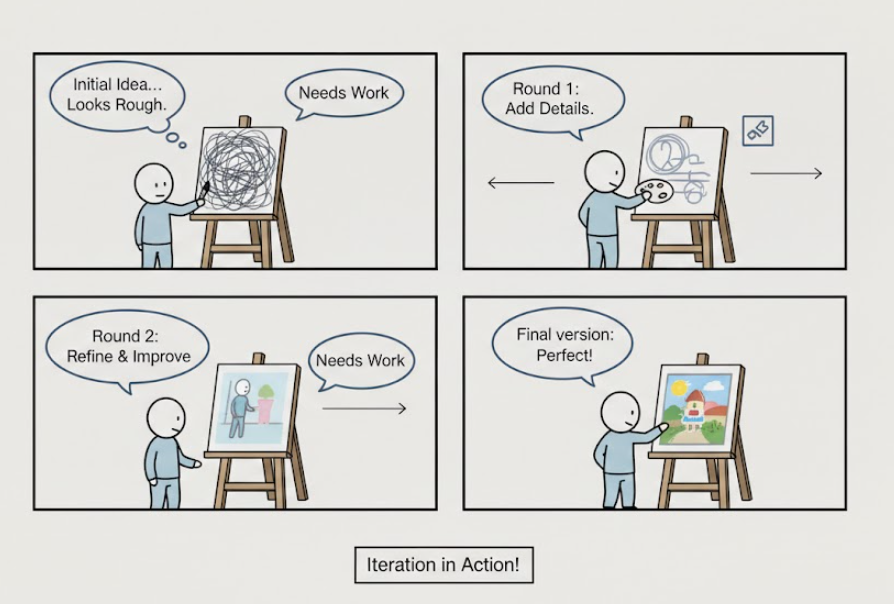
That’s iteration in action.
Four rounds. Each one targeted. Each one improved.
Total time? Maybe 10 minutes.
Result? Publication-ready content.
Types of Iterations You’ll Use
Different situations need different types of refinement.
Here are the most common.
Content Iterations
Adjusting what information is included.
Add more detail: “Expand the section about battery life. Include how long it lasts with different features on/off.”
Remove unnecessary info: “Remove all the company history. Focus only on the product features.”
Change focus: “Shift the focus from features to benefits. Instead of ‘has Bluetooth 5.0,’ explain why that matters to the user.”
Tone Iterations
Adjusting how the content sounds.
Make it more casual: “Rewrite this with shorter sentences. Use more contractions. Make it sound like a text to a friend.”
Make it more professional: “Use a more formal tone. Remove slang and casual phrases.”
Change the energy level: “Add more enthusiasm. This product genuinely solves a problem—let that excitement show.”

Structure Iterations
Adjusting how content is organized.
Reorder sections: “Move the pricing information to the beginning, right after the intro.”
Break it up: “This paragraph is too long. Break it into 3 shorter paragraphs, each focusing on one benefit.”
Combine sections: “The ‘Features’ and ‘Benefits’ sections overlap too much. Combine them into one ‘What You Get’ section.”
Format Iterations
Adjusting the presentation style.
Add formatting elements: “Add bullet points for the pros and cons sections.”
Change list style: “Convert those bullet points into short paragraphs instead.”
Add emphasis: “Bold the product name every time it appears.”
Length Iterations
Adjusting how much content you have.
Expand: “This is only 200 words. Expand it to 500 words by adding more examples and details.”
Condense: “This is too long. Cut it down to 300 words. Keep only the most important points.”
Rebalance: “The intro is too long and the conclusion is too short. Make the intro 100 words and expand the conclusion to 150 words.”
Advanced Iteration Techniques
Once you’re comfortable with basic iteration, try these.
Technique 1: The Comparison Method
Ask AI to show you options, then pick and refine.
Example: “Give me 3 different opening paragraphs for this review. Make each one use a different hook: question, story, and bold statement.”
Review the three options.
Then: “I like option 2 best, but can you make it shorter and add a specific stat about noise cancellation?”
This lets you explore options quickly.
Technique 2: The Incremental Build
Build complex content piece by piece.
Instead of asking for a complete 1000-word article, do this:
Round 1: “Write just the outline for a blog post about email marketing for beginners.”
Round 2: “Expand section 2 into full paragraphs.”
Round 3: “Now do section 3.”
Round 4: “Add examples to section 2.”
You maintain control at every step.
Technique 3: The Style Transfer
Use content you like as a reference.
Example: “Here’s a product description I love: [paste example]. Write a description for [your product] using the same style and structure.”
Then iterate: “Good, but make it less formal” or “Add more specific details like in the example.”
Technique 4: The Perspective Shift
Ask AI to rewrite from a different angle.
Example: “Rewrite this review from the perspective of a budget-conscious buyer who’s comparing this to cheaper alternatives.”
Or: “Now rewrite it for someone who doesn’t care about price but wants the absolute best quality.”
Different perspectives reveal different selling points.
Common Iteration Mistakes (And How to Fix Them)
Mistake #1: Vague Feedback
Bad: “Make it better.” Good: “The tone is too formal. Use simpler words and shorter sentences.”
Be specific about what needs to change.
Mistake #2: Changing Everything at Once
Don’t ask for 5 changes in one iteration.
Focus on 1-2 things per round.
This makes it easier to track what works.
Mistake #3: Not Reviewing Carefully
Don’t just skim the output.
Actually read it.
You’ll spot issues AI can easily fix with simple feedback.
Mistake #4: Starting Over Too Soon
Give iteration a real chance.
Try 3-4 rounds before starting fresh.
Most “failures” are just content that needs refinement.
Mistake #5: No Direction
Saying “that’s not quite right” doesn’t help.
Tell AI what IS right and what needs adjustment.
Example: “The first two paragraphs are perfect. Keep those. Rewrite paragraphs 3-5 to match that same casual tone.”
The Iteration Workflow for Different Content Types
Let’s look at specific workflows.
For Product Reviews
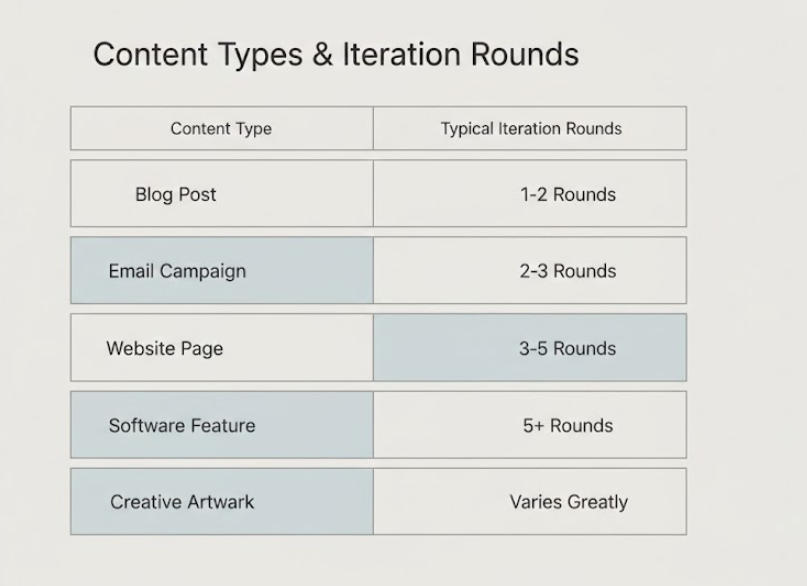
Round 1: Basic review request Round 2: Adjust tone and length Round 3: Add specific use cases or scenarios Round 4: Refine conclusion and call-to-action
For Email Sequences
Round 1: Get the basic email Round 2: Strengthen the subject line Round 3: Adjust the opening hook Round 4: Refine the call-to-action Round 5: Check flow between emails
For Blog Post Outlines
Round 1: Create the outline Round 2: Reorder sections for better flow Round 3: Add more detail to key sections Round 4: Remove weak sections
For Social Media Posts
Round 1: Get initial post
Round 2: Make it shorter and punchier
Round 3: Test different hooks
Round 4: Adjust hashtags and emoji usage
How to Know When to Stop Iterating
You don’t want to iterate forever.
Here’s when you know you’re done:
The 80/20 Rule
If you’re 80% happy with the output, stop.
You can edit the last 20% manually faster than iterating.
The Diminishing Returns Test
If your last iteration only made tiny improvements, you’re done.
The “Would I Publish This?” Test
If your honest answer is yes (maybe with minor tweaks), stop iterating.
The Time Check
If you’ve spent more time iterating than it would take to write it yourself, stop.
Usually, 3-5 iterations is the sweet spot.
Tracking Your Iterations (Optional but Helpful)
Keep a simple log of what works.
Example:
Content Type: Product Review Iterations Used: 4 What Worked: Starting broad, then adjusting tone, then adding scenarios Time Spent: 12 minutes Result: Published with minimal editing
Over time, you’ll see patterns.
You’ll learn your iteration style.
You’ll get faster at giving effective feedback.
Practice Exercise: Your First Iteration
Try this right now.
Step 1: Ask AI to write a 200-word intro for an article about [topic you know well].
Step 2: Read it. Identify 2 things that need improvement.
Step 3: Tell AI specifically what to change.
Step 4: Compare the two versions.
That’s iteration in action.
Simple, right?
Combining Iteration with Other Techniques
Iteration works great on its own.
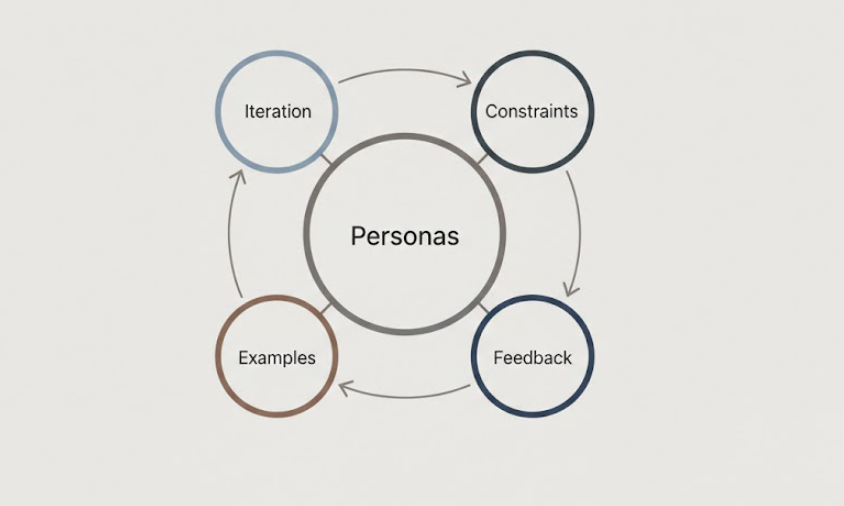
But it’s even more powerful combined with other methods.
Iteration + Constraints: Start with constraints, then iterate for refinement.
Example: “Write a 300-word product description. Use short sentences. No jargon.” Then iterate: “Good, now add more emotional appeal in the opening.”
Iteration + Examples: Provide an example, get output, then iterate.
Example: “Write an email like this: [example]. Now make it shorter.” Then iterate tone, hook, CTA.
Iteration + Personas: Define persona first, then iterate for accuracy.
Example: “Write as a 35-year-old marketer to beginners.” Then iterate: “Make it even more beginner-friendly. Explain this term.”
The techniques build on each other.
The Bottom Line
Iteration is the most beginner-friendly prompting technique.
Why?
- You don’t need perfect prompts upfront
- You learn as you go
- You stay in control
- You get exactly what you need
Stop trying to write the perfect prompt on the first try.
Start having conversations with AI instead.
Ask. Review. Refine. Repeat.
That’s the iteration method.
It’s simple. It’s effective. It works.
Your affiliate content will be better for it.
And you’ll spend less time frustrated and more time publishing.
Give it a try on your next piece of content.
You’ll wonder why you didn’t start iterating sooner.